Clawline keeps your AI close, calm, and always responsive.
Clawline is a focused iOS messaging client for Clawdbot. It connects to your own Clawd provider over WebSocket pairing.
Native SwiftUI
Built in SwiftUI for a fully native iOS experience.
Real-time WebSocket
Live messaging over WebSocket connections.
Media attachments
Send images and documents in chat.
Token-based auth
Token authentication for provider access.
Markdown rendering
Markdown support for readable messages.
Typing indicators
Shows when the assistant is typing.
Dark mode
Dark mode support across the app.
Required provider
Clawline requires a provider that’s only available in this fork of OpenClaw: clickety-clacks/clawdbot.
Questions? Ask Dumont: /dumont.html
Switching to the fork
~/.openclaw config, credentials, or workspace.
Installed via curl / npm
Switch to the fork:
npm install -g clickety-clacks/clawdbotSwitch back to upstream:
npm install -g openclaw@latestInstalled via git clone
Switch to the fork:
git remote add fork https://github.com/clickety-clacks/clawdbot.git
git fetch fork && git checkout fork/main
pnpm install && pnpm build
Switch back to upstream:
git checkout main && git pull origin main
pnpm install && pnpm build
App deploy
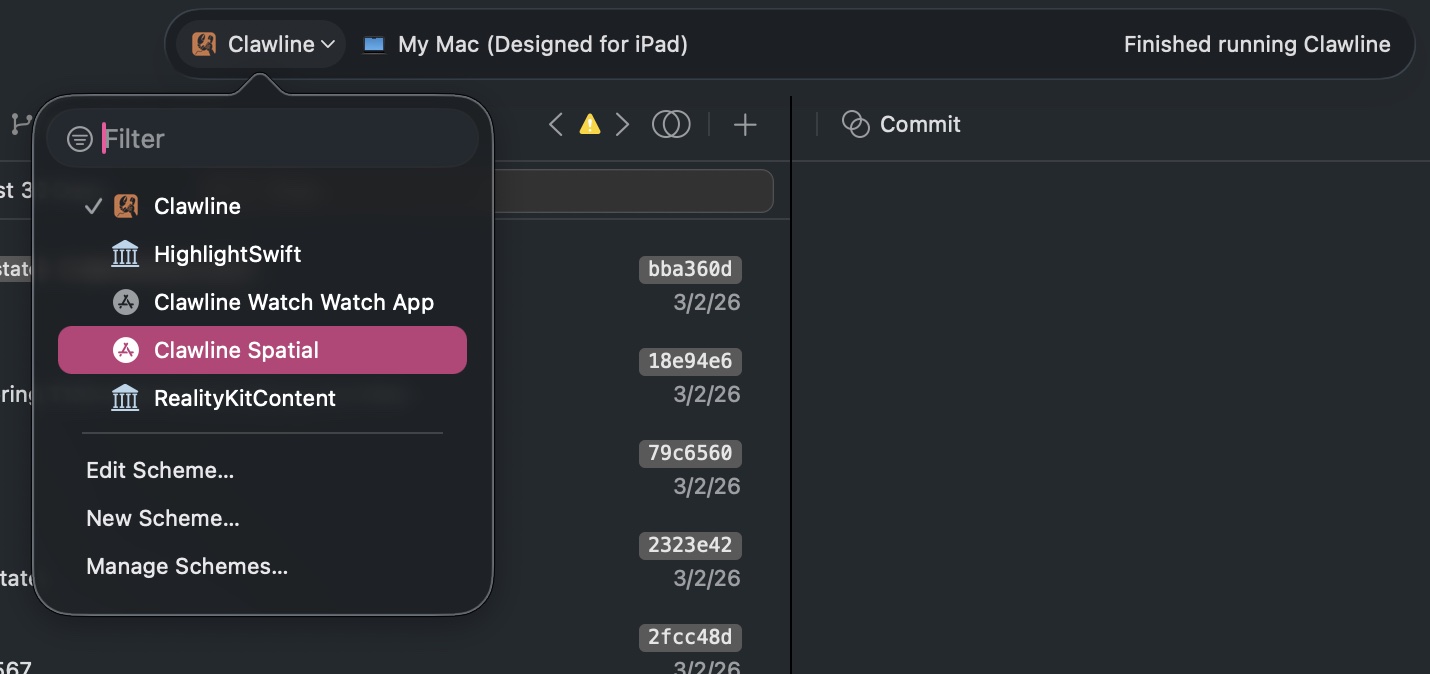
Clawline supports iOS, iPadOS, Mac Catalyst, and visionOS. The iPhone/iPad/Mac app is Clawline; the Vision Pro app is Clawline Spatial. Built from source with Xcode. Requires an Apple Developer account for device deployment.
git clone https://github.com/clickety-clacks/clawline.gitOpen Clawline.xcodeproj in Xcode:
- Select your device
- Select the correct scheme (this is choosing which version of the app you want — Clawline for iPhone/iPad/Mac, Clawline Spatial for Vision Pro)
A scheme is the app target/configuration Xcode builds and runs. For example, if you want the visionOS app, choose the Clawline Spatial scheme, then Build & Run on your selected device.